Introduction
Have you ever wondered what happens behind the scenes when you log in to a website, fill out a contact form, or shop online? Many websites use programming languages to handle these actions, and PHP is one of the technologies that helps make them possible.
PHP has been around for many years, but it is still widely used in web development. Developers rely on it to build dynamic websites, manage databases, create user accounts, and develop web applications. It is also a popular choice for beginners because its basic syntax is relatively easy to understand.
If you are just starting your coding journey, learning PHP programs for beginners can be a great way to understand how websites work. You can begin with simple programs, practice basic coding concepts, and gradually move toward building your own web applications.
In this guide, we will explore what PHP is, how it works, its important features, practical examples, latest versions, common security risks, and how beginners can start learning it.
What Is PHP?
PHP is a server-side programming language mainly used to build websites and web applications. It allows developers to create pages that can respond to user actions, process information, connect to databases, and display different content depending on the situation.
Unlike HTML, which mainly defines the structure of a webpage, PHP can perform tasks behind the scenes. For example, it can check login details, save form submissions, retrieve products from a database, or display a personalized message.
PHP originally stood for Personal Home Page. Today, its official name is PHP: Hypertext Preprocessor.
What Can PHP Do?
PHP helps developers handle many everyday website tasks, including:
- Creating login and registration systems
- Processing contact forms
- Connecting websites to databases
- Displaying personalized content
- Managing online shopping carts
- Handling file uploads
- Building website dashboards
- Creating dynamic webpages
This is what makes PHP useful for websites that need to do more than simply display static information.
How PHP Works
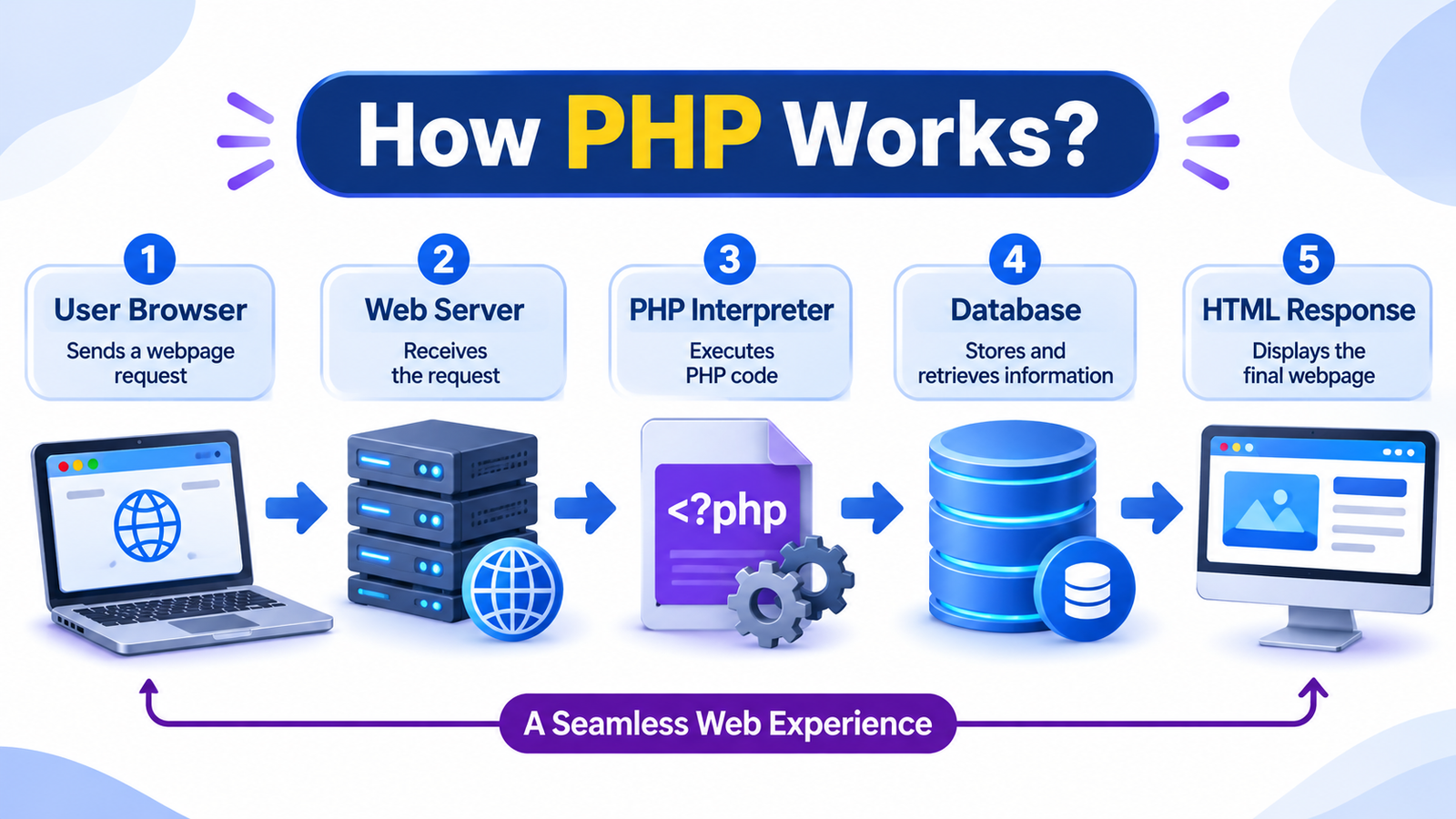
PHP works on the server, which means visitors do not usually see the original PHP code running behind a webpage. Instead, the server processes the code and sends the final result to the browser.
Imagine visiting a website and entering your username and password. PHP can receive those details, check them against stored information, and decide whether to allow you to log in.
How PHP Processes a Website Request
Here is a simple explanation of what happens when someone visits a PHP-powered website:
- A visitor opens a webpage in their browser.
- The browser sends a request to the website’s server.
- The server finds the PHP file and runs its code.
- PHP performs the required tasks, such as calculations or database queries.
- The server creates the webpage output, usually HTML.
- The browser receives the output and displays the page.
For example, when you visit an online store, PHP may retrieve product names, prices, and descriptions from a database and display them on the page.
This process allows websites to show updated information, respond to visitors, and perform tasks such as managing accounts or processing orders.
Key Features of PHP
PHP offers several useful features that make it suitable for both beginners and experienced developers.
1. Beginner-Friendly Syntax
PHP is relatively easy to get started with. You can learn basic concepts such as variables, conditions, loops, and functions without needing to understand complicated programming structures right away.
This makes it a useful language for people learning how web development works.
2. Free and Open-Source
PHP is free to download and use. Developers can work with it for personal projects, educational purposes, business websites, and commercial applications without purchasing a programming language license.
3. Works With Databases
PHP can connect with databases such as MySQL, PostgreSQL, and SQLite. This makes it possible to store and retrieve information like user accounts, blog posts, customer details, and product records.
4. Compatible With Different Platforms
PHP works on operating systems such as Windows, Linux, and macOS. It also supports many web server environments, which gives developers flexibility when setting up their projects.
5. Supports Modern Frameworks
Developers can use frameworks such as Laravel and Symfony to build applications more efficiently. These frameworks provide tools and structures that help organize code, handle common tasks, and simplify larger projects.
6. Works With Other Web Technologies
PHP can be used alongside HTML, CSS, JavaScript, APIs, and databases. Developers can combine these technologies to create websites that are interactive, functional, and easier to maintain.
PHP Programs for Beginners: Simple Examples
The best way to learn programming is by practicing it. Instead of only reading about PHP, beginners should try writing small programs and see what happens when they run them.
These examples introduce some of the basic concepts you will use in PHP development.
Example 1: Displaying Hello World
Most beginners start with a simple program that displays a message.
<?php
echo “Hello, World!”;
?>
Output:
Hello, World!
The echo statement tells PHP to display the text. This small example helps you understand how PHP code is written and executed.
Example 2: Adding Two Numbers
PHP can also perform simple calculations.
<?php
$num1 = 15;
$num2 = 25;
$sum = $num1 + $num2;
echo “Total: ” . $sum;
?>
Output:
Total: 40
Here, $num1 and $num2 are variables used to store numbers. PHP adds them together and displays the result.
Example 3: Checking Whether a Number Is Even or Odd
You can use conditions to make a program perform different actions depending on the result.
<?php
$number = 8;
if ($number % 2 == 0) {
echo “Even number”;
} else {
echo “Odd number”;
}
?>
Output:
Even number
The program checks whether the number can be divided by two without leaving a remainder. If it can, the number is even. Otherwise, it is odd.
Example 4: Printing Numbers Using a Loop
Loops are useful when you want a program to repeat the same task several times.
<?php
for ($i = 1; $i <= 5; $i++) {
echo $i . “<br>”;
}
?>
Output:
1
2
3
4
5
Instead of writing five separate instructions, the loop does the work for you. This is useful when displaying lists, processing records, or performing repeated calculations.
What Should Beginners Learn First?
If you are learning PHP from scratch, follow a simple learning order:
- Variables and data types
- Operators and expressions
- If-else conditions
- Loops
- Arrays
- Functions
- Forms and user input
- Database connectivity
- Error handling
- Basic website security
You do not need to master everything at once. Start with the basics, practice regularly, and move to more advanced topics when you feel comfortable.
Where Is PHP Used in Web Development?
PHP is used for many types of websites and applications. Its flexibility allows developers to create everything from simple blogs to larger online platforms.
Content Management Systems
Many content management systems use PHP to manage website content, themes, plugins, and administrative features. WordPress is one of the best-known examples.
It allows website owners to publish articles, update pages, manage media, and customize their websites without having to write every feature from scratch.
E-Commerce Websites
PHP can help power online stores by handling product information, customer accounts, shopping carts, orders, and inventory.
It can also work with payment systems and other services that help businesses manage their online sales.
Web Applications
Developers use PHP to build applications such as booking systems, customer dashboards, business portals, and online management tools.
These applications can help users complete tasks, access information, and manage their accounts through a browser.
Contact Forms and User Submissions
When someone fills out a contact form, PHP can receive the information and process it. It may save the submission in a database, send an email, or display a confirmation message.
This makes PHP useful for websites that need to communicate with visitors.
Database-Driven Websites
PHP can retrieve information from a database and display it on a webpage.
For example, a news website may use PHP to fetch article titles, images, categories, and publication dates. Instead of manually creating every page, the website can display content automatically.
PHP Development: Tools Beginners Need
You do not need expensive software to start learning PHP. A few basic tools are enough to create and test your first programs.
Tools You Can Use
- Code editor: Visual Studio Code or another editor for writing and editing code.
- Local server: XAMPP, WAMP, or another local development environment.
- Database: MySQL or MariaDB for practicing database operations.
- Web browser: Chrome, Firefox, or another browser for testing your webpages.
- Documentation: The official PHP website for learning functions, syntax, and language features.
A local development environment lets you practice on your own computer without publishing your unfinished projects online.
How to Run a PHP Program
Follow these basic steps to run your first PHP file:
- Install a local server environment that includes PHP.
- Create a project folder inside the server’s web directory.
- Create a file and save it with the .php extension.
- Write your code and save the file.
- Start the web server.
- Open your project in a browser using the local server address.
For example, if your file is called index.php, you may open it using http://localhost/index.php, depending on your local setup.
Once the environment is ready, you can start experimenting with different programs and gradually build more useful projects.
PHP Latest Version in 2026
PHP continues to evolve with new features, performance improvements, bug fixes, and security updates. Developers should use a version that is officially supported and compatible with their websites and applications.
As of November 25, 2026, PHP 8.6.0 is identified as the latest stable major release, with its release date listed as November 19, 2026.
PHP 8.6.0
The PHP 8.6 release introduces new features and improvements designed to make development more flexible. Some of the changes highlighted for this version include:
- Partial Function Application
- Duration class
- Polling API
- clamp() function
Developers interested in the latest features should review the official release notes before upgrading their projects.
PHP Version Support
Different PHP releases have different support timelines. Older versions may stop receiving regular updates, while supported releases continue to receive improvements or security fixes.
| PHP Version | Support Status | Security Support Ends |
| PHP 8.2 | Security support | December 31, 2026 |
| PHP 8.3 | Security support | December 31, 2027 |
| PHP 8.4 | Active support | December 31, 2028 |
| PHP 8.5 | Active support | December 31, 2029 |
| PHP 8.6 | Active support | December 31, 2030 |
PHP releases generally receive active support for two years, followed by two years of security support. Once a version reaches the end of its support period, it no longer receives official security fixes.
Why Is Updating PHP Important?
Running an outdated version can leave a website exposed to known security issues and compatibility problems. Updating to a supported release can help developers:
- Protect websites against known vulnerabilities
- Improve application performance
- Fix bugs and unexpected errors
- Use newer programming features
- Maintain compatibility with modern frameworks
- Make future updates easier
Before upgrading, test your website carefully. Plugins, themes, frameworks, and existing code may not work properly with every new release.
PHP Security Risks and Common Vulnerabilities
PHP is capable of supporting secure websites, but security problems can occur when applications are poorly coded, software is outdated, or server settings are not configured correctly.
A PHP vulnerability is a weakness in PHP software, an application, a library, or its configuration that could allow an attacker to access information, modify data, or interfere with a website.
Understanding common risks can help developers avoid mistakes when building or maintaining websites.
1. SQL Injection
SQL injection occurs when an application places unsafe user input directly into a database query.
An attacker may try to manipulate the query to access information they should not be able to see or change.
How to prevent it: Use prepared statements, parameterized queries, and appropriate database permissions.
2. Cross-Site Scripting (XSS)
Cross-site scripting happens when a website displays untrusted content without properly handling it. In some cases, attackers can inject scripts that run in another user’s browser.
How to prevent it: Validate user input and escape output correctly before displaying it on a webpage.
3. File Upload Vulnerabilities
File upload features can create security risks if a website accepts files without checking them properly.
For example, allowing unsafe files to be uploaded and executed could put the website at risk.
How to prevent it: Check file types, restrict file sizes, rename uploaded files, and store them in locations where they cannot execute as server-side code.
4. Weak Authentication
A poorly designed login system may expose user accounts. Weak passwords, insecure sessions, and improper authentication checks can make it easier for attackers to gain unauthorized access.
How to prevent it: Use secure password hashing, protect sessions, apply login restrictions, and consider multi-factor authentication where appropriate.
5. Outdated Software
Older PHP versions, plugins, frameworks, and libraries may contain security weaknesses that are already known to attackers.
How to prevent it: Update your software regularly, remove unnecessary components, and check whether your dependencies are still maintained.
PHP Security Best Practices
Security should be part of every development project, not something developers think about only after a website has been attacked.
Here are some practical steps that can help protect PHP applications:
- Keep PHP and other software updated.
- Use HTTPS to protect information during transmission.
- Never store passwords in plain text.
- Use secure password hashing methods.
- Validate and sanitize input where appropriate.
- Use prepared statements for database queries.
- Disable unnecessary functions and extensions.
- Avoid displaying detailed error messages on live websites.
- Keep sensitive credentials outside publicly accessible files.
- Back up website files and databases regularly.
- Review libraries and dependencies for known security issues.
Following these practices can reduce common risks and make a website easier to maintain.
Advantages and Limitations of PHP
PHP has many benefits, especially for people who are learning web development. However, like any programming language, it also has limitations.
Advantages of PHP
- Easy to get started: Beginners can learn its basic syntax without a complicated setup.
- Free to use: PHP is open-source and does not require a paid license.
- Hosting support: Many web hosting providers support PHP.
- Database connectivity: It works with popular database systems.
- Frameworks: Frameworks help developers build and manage larger applications.
- Learning resources: There are plenty of tutorials, documentation, and community resources.
- Existing website support: PHP is used by many established websites and content management systems.
Limitations of PHP
- Applications can become difficult to maintain when the code is poorly organized.
- Security depends on the developer’s coding practices and server configuration.
- Older websites may experience compatibility problems during upgrades.
- Larger projects may need frameworks, testing, and proper application architecture.
PHP works best when developers follow modern coding standards and keep their applications organized, updated, and secure.
How to Start Learning PHP in 2026
If you want to learn PHP but do not know where to begin, you do not need to rush into complicated projects. Start with simple concepts and build your skills step by step.
Step 1: Understand Basic Programming
Learn how variables, data types, operators, conditions, loops, and functions work. These concepts will help you understand PHP and other programming languages in the future.
Step 2: Practice Small Programs
Start by writing programs that display messages, perform calculations, compare numbers, and accept basic input.
Practicing regularly helps you understand why code works instead of simply copying examples.
Step 3: Learn How PHP Works With HTML
Once you understand the basics, try combining PHP with HTML. Learn how to display information, create forms, and process user submissions.
This is where your programs start becoming useful for real websites.
Step 4: Learn Database Basics
Explore how databases store information. Practice creating tables, inserting records, retrieving data, and updating information through PHP.
Understanding databases is an important skill for anyone interested in building dynamic websites.
Step 5: Build Small Projects
Try creating projects that solve simple problems, such as:
- A basic calculator
- A contact form
- A student information system
- A registration and login page
- A simple blog
- A task management application
These projects give you practical experience and help you understand how different programming concepts work together.
Step 6: Explore PHP Frameworks
After learning the basics, you can move toward frameworks such as Laravel. They help developers organize code, handle common tasks, and build applications more efficiently.
You do not need to learn a framework immediately. Focus on understanding PHP first, then explore more advanced tools when you are ready.
Frequently Asked Questions (FAQs)
1. Is PHP easy to learn for beginners?
Yes, PHP is relatively easy to learn if you are new to programming. Start with variables, conditions, loops, and functions, then gradually move toward forms, databases, and website development.
2. Is PHP still used in web development in 2026?
Yes. PHP is still used to build websites, content management systems, online stores, and web applications. It continues to receive updates and improvements, making it relevant for modern web development.
3. What is the latest stable PHP version?
As of November 25, 2026, PHP 8.6.0 is listed as the latest stable major release. Developers should check the official PHP website for the newest release information and updates.
4. Can PHP be used to create dynamic websites?
Yes. PHP can process user requests, connect to databases, manage login systems, display personalized content, and generate webpages based on different information.
5. Is PHP secure for website development?
PHP can be used to develop secure websites, but security depends on how the application is written and maintained. Using updated software, prepared database statements, secure authentication, and proper input validation helps reduce security risks.
Conclusion
PHP continues to be a useful programming language for anyone interested in website development. It offers a simple starting point for beginners while providing tools and features that developers can use to build more advanced applications.
Learning how PHP works, practicing basic programs, understanding databases, and exploring website security can help you develop practical coding skills. You do not need to know everything on your first day. Start with small programs, practice regularly, and gradually work toward building your own projects.
Keeping your software updated and following good security practices is equally important, especially when developing websites that handle user information.
If you are beginning your coding journey, PHP programs for beginners can help you understand programming logic, build confidence, and take your first steps toward creating real-world websites and web applications.